Coppice, a sponsor tracker for Purdue clubs
CoppiceOctober 2026Purdue Launchpad project · in development
What Coppice is
Coppice is a web app where a Purdue club keeps its sponsor list. I built it as a student project, and it is still in development.
Clubs usually run sponsor outreach from one shared spreadsheet. Two officers email the same company because nobody updated the owner column, follow-ups get forgotten, and the notes leave when the seniors graduate. Coppice keeps each company with one officer at a time, brings it back in a queue on its follow-up date, and keeps the history in the club's workspace after the board changes.
It is a Next.js 16 app on Postgres (hosted on Supabase), using Prisma, Better Auth for Google sign-in and Gemini for the AI features. The tests run against a real Postgres instead of a mock, which matters for the parts below. The database tests use seed and fixture data, and the Gemini behaviour below is from live calls during development. This page covers the parts that took the most thought: claims, keeping clubs apart, look-alike companies and the AI drafts.
Claims: one officer per company
Before contacting a company, an officer claims it. Everyone can see who holds it and until when, and the claim lapses after the workspace's claim window if nothing is logged. While someone else's claim is live, nobody but an owner can log outreach on that company or move its stage.
Reading the row and checking in code lets two officers who click at the same moment both pass. So the claim is one UPDATE whose WHERE clause decides who wins, simplified here:
UPDATE "Company"
SET "claimedById" = $user,
    "claimExpiresAt" = now() + $claim_window
WHERE id = $company
  AND "workspaceId" = $workspace
  AND "archivedAt" IS NULL
  AND ("claimedById" IS NULL
       OR "claimExpiresAt" <= now()
       OR "claimedById" = $user)
RETURNING "claimExpiresAt"If a row comes back, the officer holds the company. If not, a second query finds out who does, so the message can say who claimed it first and until when. Postgres locks the row while the first update runs, so the second one waits, re-evaluates the WHERE clause after the first commits, and matches nothing. Expiry uses now() in the database, so the web server's clock never matters.
Logging outreach goes through the same gate. Its UPDATE only matches if you hold a live claim, and if it matches nothing, no outreach row is written. One test races an officer logging on an expired claim against an owner claiming the same company, 20 times. The log always fails and the claim always succeeds. Another test fires 50 pairs of simultaneous claims and checks that exactly one wins each time.
The limit is that this only protects people who use the app. Nothing stops two officers who email the same company from their own accounts without claiming it first.
Keeping clubs' data apart
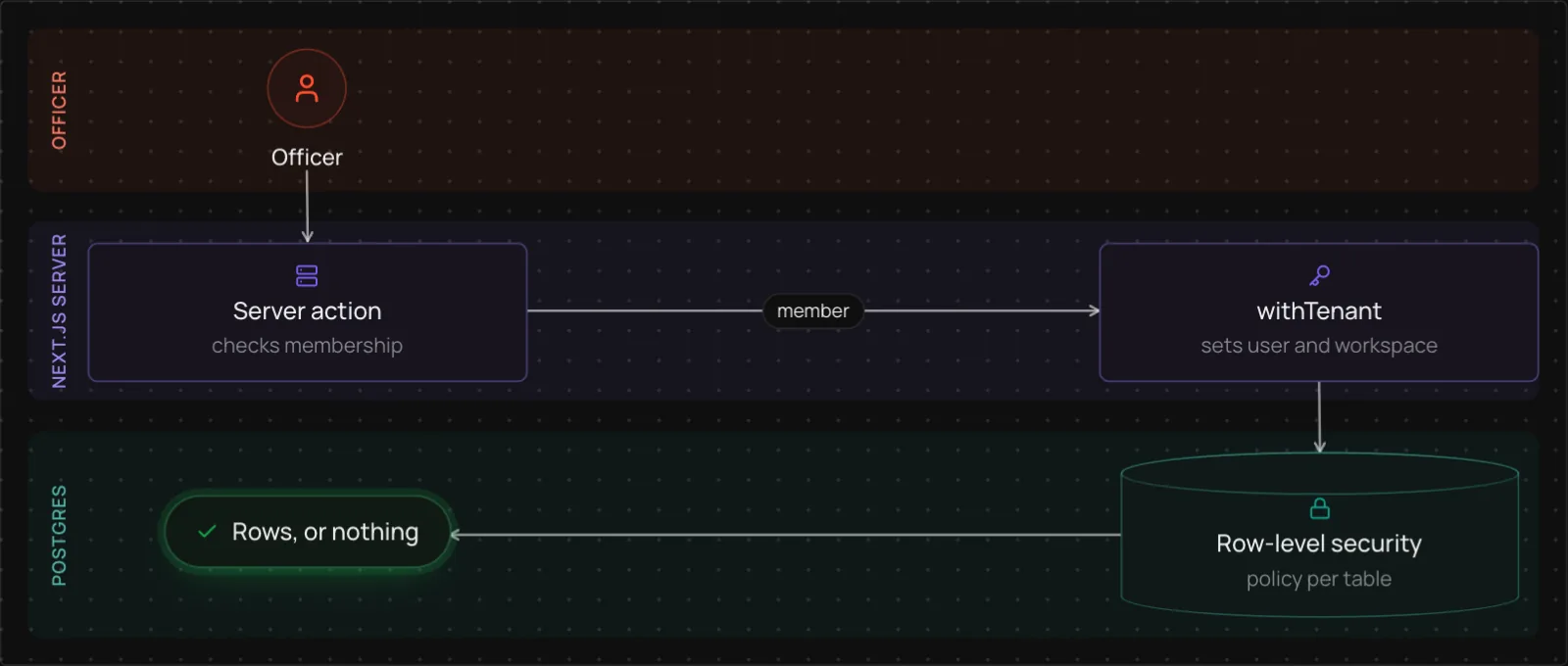
Each club is a workspace, and one club must not see another's sponsors. The app code already filters by workspace. Postgres row-level security (RLS) is a second line of defence in case I forget a filter: each tenant table has a policy that only lets a transaction see rows from its own workspace, and only if the user is a member of it.
Queries for workspace data run inside withTenant, which opens a transaction and tells Postgres who is asking:
export function withTenant(tenant, run) {
  return prisma.$transaction(async (tx) => {
    await tx.$executeRaw`SELECT
      set_config('app.user_id', ${tenant.userId}, true),
      set_config('app.workspace_id', ${tenant.workspaceId}, true)`;
    return run(tx);
  });
}The true makes each setting last only until the transaction ends. That matters because Supabase's connection pooler gives the same connection to other requests afterwards, and a plain SET would carry one request's workspace into the next. The policies read those settings:
ALTER TABLE "Company" FORCE ROW LEVEL SECURITY;

CREATE POLICY tenant_isolation ON "Company"
  USING ("workspaceId" = current_setting('app.workspace_id', true)
AND is_member_of_current_workspace());The app connects as app_user, a role that cannot bypass RLS, and FORCE applies the policy to the table owner as well. The tests check that a query with no tenant set sees zero rows, and a separate test lists every table with a workspaceId column and fails if one has no policy (Better Auth's membership and invitation tables are the exceptions, protected in app code). Two more tests scan the source as text: every server action must begin with an auth check, and nothing outside lib/claims.ts may write a claim field. They are crude string checks.
Look-alike companies
Sponsor lists are typed by many people, so one company shows up as “Acme, Inc.” and “ACME Corp”. When a company is saved, Coppice normalises the name (both examples become acme) and the website's host, and flags companies that share either one as possible duplicates.
The flag is all that happens. Nothing is merged or deleted automatically, because two different companies can share a name and merging would lose real history. The board shows the group, and a person archives one copy or marks the pair as separate, after which it never flags again. The same check runs when a club imports its old spreadsheet as a CSV.
AI drafts from verified facts
A drafting model can make up a price or claim a past sponsorship, so drafts use only facts an owner has verified from the club's packet.
An owner uploads the club's sponsorship packet as a PDF, and the text is read page by page. The model proposes facts from it, each with a page number and an exact quote. Code then checks that the quote is on that page (ignoring ligatures, smart quotes and hyphenated line breaks) and that every number in the fact also appears in the quote. An owner still has to verify each fact before it counts, and can edit or add facts by hand.
When an officer asks for a draft, Coppice claims the company first, so two officers cannot draft to the same one. The model writes two variants from the verified facts. It never sees a name or an email address: the recipient is described by job title, the email says {{firstName}} and {{senderName}}, and code fills those in afterwards. Emails and phone numbers in the PDF are masked before anything goes to the model, because the free Gemini tier may use prompts to improve Google's products.
Each draft then gets two checks. Plain rules in code, which run in the browser as the officer edits, flag a number that no verified fact contains, phrases that claim a past relationship such as “sponsored us before”, and links. A second model call reads the draft against the facts and lists statements the facts do not support. A finding is kept only if its quoted text appears in the draft, the same check used on the facts. Coppice never sends email: a draft opens in the officer's Gmail, Outlook or mail app, and the officer logs the outreach afterwards.
Free-tier rate limits were the practical trouble. At one point a model hung for 45 seconds while another answered in about six, so each feature tries its main model briefly and then falls back to another. On 26 October one model ran out of quota while Flash-Lite still answered, so I added it as the last fallback for drafting. It sometimes wrote real-looking names instead of the placeholders (a “Hi John” to someone named Hank), so code now rejects any draft that does not greet and sign through them. The checks catch a made-up number or a quote that is not in the packet, but not a sentence that is plausible and wrong, and one of them is itself a model.
What is unfinished
Coppice is in development, and the tests and my own runs use seed and fixture data. A few things are rough or missing:
- Invitations do not send email. The invited person has to be told and then accept inside the app.
- Sign-in is Google only, and only an allowlist of emails can create a workspace.
- The AI features depend on a free-tier model, which can be slow, busy or wrong, and each workspace has a capped number of AI calls.
Next I want reply rates for each pitch template and research briefs before outreach.